
Automating Email Triage with Generative AI: How Amazon Bedrock and SES Mail Manager Work Together
Your team processes hundreds—maybe thousands—of emails per day. Each one needs to be read, understood, categorized, and routed to the right person.
That’s a lot of human brainpower spent on triage.
What if AI could handle that categorization in seconds? What if urgent emails automatically escalated, routine inquiries queued for batch processing, and spam silently filtered—all without human intervention?
Amazon Bedrock and SES Mail Manager make this possible. Here’s how it works.
Table of Contents
- The Email Overload Problem
- How AI Categorization Works
- The Architecture: SES to Bedrock
- Customizing Categories and Urgency
- Integration with Downstream Systems
- Security Considerations
- Real-World Applications
- Getting Started
The Email Overload Problem
Email volumes keep growing. McKinsey found that knowledge workers spend 28% of their workweek reading and responding to email—that’s over 11 hours per week.
For teams handling shared inboxes—support, sales, HR—the problem compounds:
Manual triage is slow. Someone reads each email to determine where it should go. That’s cognitive load that could be applied to actual problem-solving.
Urgency gets missed. A critical customer complaint sits unread while the team works through a queue of routine requests.
Routing is inconsistent. One person categorizes an email as “billing,” another calls the same type “account question.” Reporting becomes meaningless.
Context is lost. When emails get forwarded between teams, the original context often doesn’t follow.
It doesn’t scale. Double your email volume, and you need to double your triage capacity—or watch response times climb.
AI categorization changes the equation. Instead of humans reading every email to route it, AI reads and categorizes instantly. Humans focus on responding, not sorting.
How AI Categorization Works
Generative AI models like those available in Amazon Bedrock can understand email content and classify it according to your definitions.
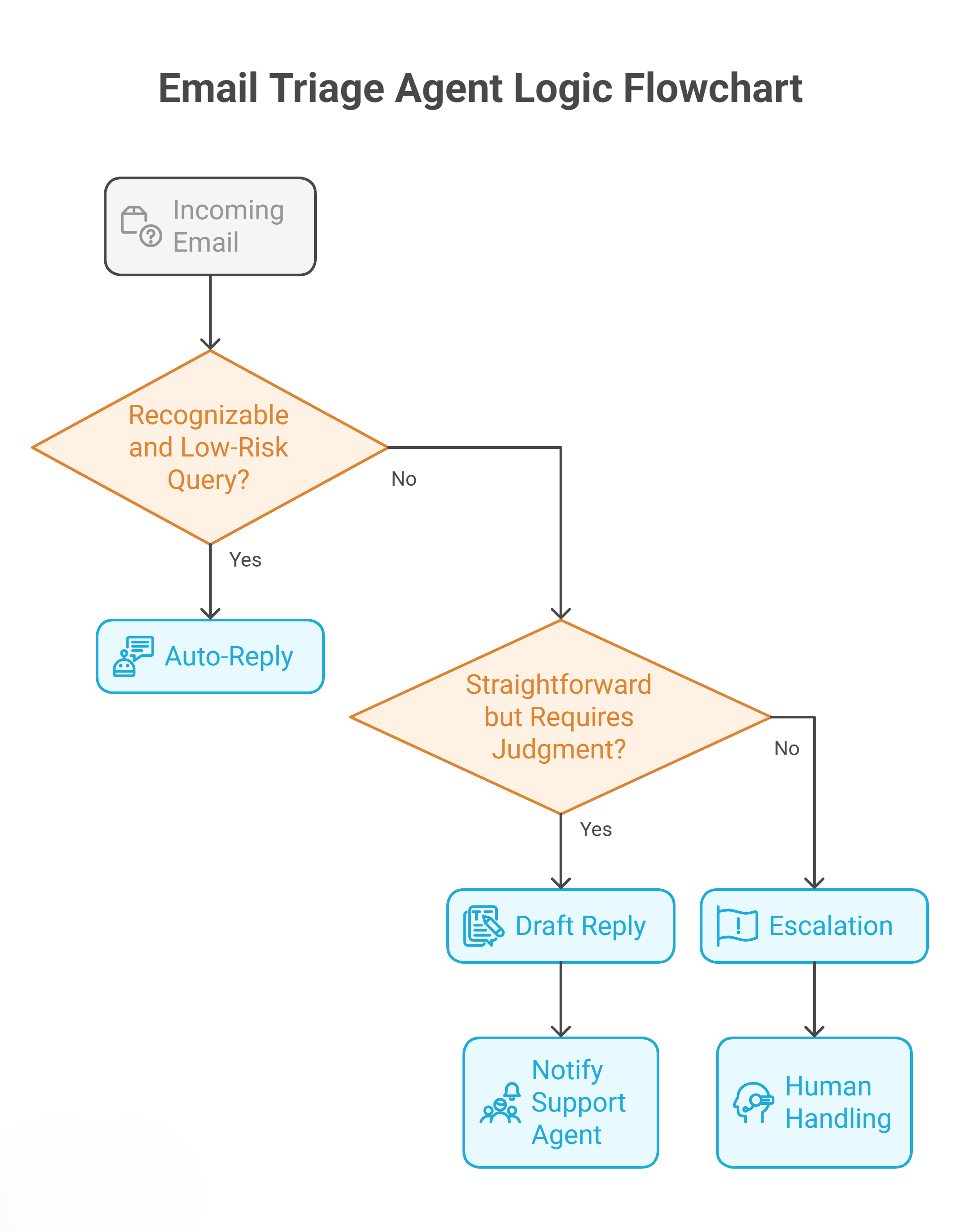
The Basic Flow
- Email arrives at your domain
- SES Mail Manager receives and applies security scanning
- Clean emails stored in S3, triggering a Lambda function
- Lambda extracts content from the MIME-formatted message
- Bedrock analyzes the content using your category definitions
- AI assigns category and urgency based on the email content
- Metadata stored in DynamoDB for tracking
- Downstream routing sends the email to the right queue
What the AI “Sees”
The Lambda function extracts:
- Subject line
- Sender information
- Email body (plain text and/or HTML)
- Attachment names (not content, for security)
This content gets sent to Bedrock with a prompt that defines your categories and asks the model to classify the email.
Model Options
Amazon Bedrock offers multiple models for this task:
| Model | Speed | Cost | Quality |
|---|---|---|---|
| Amazon Nova Micro | Fast | Low | Good for simple categorization |
| Amazon Nova Lite | Medium | Medium | Better nuance detection |
| Claude 3 Haiku | Fast | Low | Strong reasoning, concise |
| Claude 3 Sonnet | Medium | Medium | Excellent accuracy |
For most email categorization, Nova Micro or Claude Haiku provide sufficient accuracy at low cost. More complex categorization (detecting nuanced complaints, legal issues) may benefit from more capable models.
The Architecture: SES to Bedrock
AWS provides a sample implementation that demonstrates the full architecture.
Component Breakdown
┌─────────────────┐
│  Inbound Email  │
└────────┬────────┘
         │
┌────────▼────────┐
│ SES Mail Manager│──────────────────┐
│  + Vade Add-on  │                  │
└────────┬────────┘                  │
         │ (clean emails)            │ (spam/virus)
┌────────▼────────┐           ┌──────▼──────┐
│    S3 Bucket    │           │  Quarantine │
└────────┬────────┘           └─────────────┘
         │ (S3 event)
┌────────▼────────┐
│     Lambda      │
│  (MIME Parser)  │
└────────┬────────┘
         │
┌────────▼────────┐
│ Amazon Bedrock  │
│ (Categorization)│
└────────┬────────┘
         │
    ┌────┴────┐
    │         │
┌───▼───┐ ┌───▼───┐
│  SNS  │ │  DDB  │
│Topics │ │ Store │
└───┬───┘ └───────┘
    │
┌───▼───┐
│  SQS  │
│Queues │
└───────┘
SES Mail Manager
SES Mail Manager is the entry point for inbound email:
- Receives emails sent to your domain
- Applies rule sets for routing
- Integrates with Vade for threat detection
- Stores clean emails in S3
Vade Add-on
The Vade Add-on provides:
- Spam filtering
- Virus scanning
- Phishing detection
- Malware analysis
Only clean emails proceed to categorization. Threats are quarantined.
Lambda Parser
The Lambda function:
- Triggers on S3 object creation
- Parses MIME format to extract text content
- Handles multipart messages (text + HTML)
- Constructs the prompt for Bedrock
- Handles the categorization response
Bedrock Categorization
The core intelligence. A prompt like:
Analyze the following email and categorize it.

Categories:
- sales_inquiry: Requests for pricing, demos, or purchasing information
- support_request: Existing customer asking for technical help
- billing_question: Questions about invoices, payments, or account charges
- complaint: Expression of dissatisfaction or formal complaint
- general_inquiry: General questions not fitting other categories
- spam: Promotional or irrelevant content that passed filters

Urgency levels:
- critical: Requires response within 1 hour
- high: Requires same-day response
- normal: Standard response time (24-48 hours)
- low: No specific time pressure

Email subject: {subject}
Email from: {from}
Email body:
{body}

Respond in JSON format:
{"category": "...", "urgency": "...", "reasoning": "..."}
Customizing Categories and Urgency
The sample provides default categories, but you should customize for your business.
Defining Effective Categories
Be specific: “support_request” is vague. Consider breaking into:
- password_reset
- bug_report
- feature_request
- how_to_question
Be mutually exclusive: Avoid categories that overlap. If an email could reasonably be two categories, either combine them or refine the definitions.
Be comprehensive: Include an “other” or “uncategorized” bucket for emails that don’t fit.
Match your workflows: Categories should align with your actual teams or processes. If you don’t have a separate billing team, don’t create a billing category.
Urgency Calibration
Define urgency in terms of actual response time expectations:
critical: Outage, security incident, legal threat, major customer issue
         → Response within 1 hour
         → Notify on-call immediately

high: Customer complaint, time-sensitive request, deadline mentioned
      → Response within 4 hours
      → Queue for immediate processing

normal: Standard support request, general inquiry
        → Response within 24 hours
        → Regular queue

low: FYI emails, newsletters, non-urgent updates
     → Response within 48+ hours or no response needed
     → Batch processing OK
Prompt Engineering Tips
- Provide examples: Include 2-3 example emails for each category in your prompt
- Define edge cases: Explicitly state how to handle ambiguous situations
- Request reasoning: Having the model explain its decision helps with debugging
- Test extensively: Run production emails through the system and verify accuracy before going live
Integration with Downstream Systems
Categorization is just the beginning. The value comes from what you do with the categorized emails.
SNS Topics and SQS Queues
Create per-category routing:
| Category | SNS Topic | SQS Queue | Processing |
|---|---|---|---|
| support_request | support-topic | support-queue | Zendesk integration |
| sales_inquiry | sales-topic | sales-queue | Salesforce lead creation |
| complaint | escalation-topic | escalation-queue | Manager notification |
| billing_question | billing-topic | billing-queue | NetSuite integration |
Immediate Actions for Critical Urgency
Critical emails shouldn’t wait in a queue:
Critical → SNS → Lambda → Amazon Connect (outbound call)
                       → SMS to on-call (via End User Messaging)
                       → Slack notification
Auto-Response Possibilities
For well-defined categories, you can generate automatic responses:
password_reset → Trigger password reset flow → Send reset link
how_to_question → Query Knowledge Base → Send helpful article
out_of_office_detection → Skip queue → No action needed
CRM Integration
Pass categorization metadata to your CRM:
- Create cases with category pre-filled
- Assign to appropriate queues
- Set priority based on urgency
- Attach original email content
Security Considerations
Email content is sensitive. Handle with care.
PII in Email Content
Emails often contain personally identifiable information:
- Names, addresses, phone numbers
- Account numbers
- Health information
- Financial data
Mitigations:
- Use Amazon Comprehend to detect and redact PII before logging
- Limit what gets stored in DynamoDB (category and urgency, not full content)
- Encrypt S3 buckets with customer-managed KMS keys
- Apply strict IAM policies to Lambda functions
Bedrock Data Handling
When you send email content to Bedrock:
- Data is encrypted in transit
- Amazon does not use your inputs to train models (when using Bedrock)
- Consider Bedrock Guardrails to filter sensitive information
Access Controls
- Restrict who can view email content in S3
- Audit access via CloudTrail
- Use separate IAM roles for each Lambda function
- Implement least-privilege everywhere
Compliance Considerations
Depending on your industry:
- HIPAA: Healthcare emails need extra protections
- PCI DSS: Payment card data requires specific handling
- GDPR: European sender data has retention requirements
- SOC 2: Audit logging and access controls are essential
Real-World Applications
Customer Support Triage
Before: Support team manually reads every email, assigns priority, routes to specialists.
After: AI categorizes by issue type (billing, technical, account), assigns urgency, routes to specialized queues. Team focuses on responding, not sorting.
Results: 60% reduction in triage time, faster response to critical issues.
Legal and Compliance Intake
Before: Legal team manually monitors shared inbox for contracts, compliance questions, regulatory notices.
After: AI flags anything legal-related with appropriate urgency. Contract requests route to contracts team. Regulatory notices escalate immediately.
Results: No more missed deadlines, clear audit trail.
Sales Lead Qualification
Before: Sales ops manually reviews inbound emails to identify leads.
After: AI detects sales inquiries, categorizes by product interest, scores based on language signals (budget mentioned, timeline indicated). Hot leads route immediately.
Results: Faster lead response, higher conversion rates.
HR Inquiry Management
Before: HR shared inbox with everything from benefits questions to harassment reports mixed together.
After: AI separates routine benefits questions (auto-responded with links), policy questions (queued), and sensitive matters (escalated immediately with confidentiality).
Results: Sensitive issues handled faster, routine questions self-served.
Getting Started
Implementing AI email categorization requires:
- Domain and SES setup: Configure SES Mail Manager to receive email for your domain
- Vade subscription: Add threat detection (additional cost)
- Bedrock access: Enable model access in your AWS account
- CDK deployment: Deploy the sample infrastructure
- Category customization: Define categories and urgency for your use case
- Integration development: Connect to your downstream systems
- Testing: Run production-like email through the system
- Monitoring: Build dashboards for categorization accuracy
The sample gets you 60% of the way there. The remaining 40%—customization, integration, security hardening, and operationalization—is where expert help accelerates your timeline.
AllCode Can Help
As an AWS Advanced Consulting Partner with GenAI Competency, AllCode has implemented AI-powered email processing for enterprises across industries.
We help with:
- Architecture design tailored to your email volumes and patterns
- Category definition that matches your business processes
- Integration with your existing ticketing, CRM, and communication systems
- Security review ensuring compliance with your industry requirements
- Ongoing optimization as your needs evolve
Ready to stop manually triaging email?
Schedule a free 30-minute GenAI architecture review →
Let’s discuss your email volumes, current pain points, and how AI categorization could transform your operations.