
This week on nexus-proxy we built the largest single feature in the roadmap so far: developers
now sign in on their own proxy, in their own AWS account, and never touch a page run by anyone
else. No AllCode host in the login path, no redirect, no ?proxy= in the URL. The proxy mints and
checks its own keys, one per machine, and keeps doing both even when AllCode’s systems are
unreachable. This post walks through what shipped (roughly TASK-480 through TASK-529), why it is
built the way it is, and where it stands now that it is running on dev. For the architecture
underneath nexus-proxy itself, see Nexus Proxy: An Inline Governance Plane for AI Coding Agents on
Bedrock and Building a
Billing-Grade AI Usage-Metering Gateway.
Why move sign-in at all
The earlier design signed developers in through a central AllCode endpoint and handed the proxy a
credential. That works, but it couples a customer’s ability to log in to AllCode’s uptime, and it
means a developer’s browser visits a page we run on their behalf. For a product whose whole pitch
is “your AI traffic, your AWS account, your Bedrock,” the login page living somewhere else was the
odd one out.
The new rule is simple: everything a developer sees at https://<your proxy>/login is served by
the proxy itself, out of the customer’s own account. AllCode still receives usage events and the
heartbeat, and AllCode staff can still take access away in an emergency, but the proxy is now the
authority on who may sign in and which keys are valid.
The shape of it
Three things had to exist for this to work:
nexus-web, a small Go service that runs beside the proxy in the same ECS task. It serves
/login, the setup pages, the self-service/keyspage and the admin identity screens. It is
the first slice of the one web app the proxy admin and proxy home features will build on.- A per-installation key store in DynamoDB. Each proxy mints its own
nxk_keys, one per
machine, each revocable, and checks every key against its own table. No shared central key list. - A sign-in core that ports every method we support (SAML 2.0, OIDC, Cognito, IAM-key
browser signing, and trusted third-party JWTs) and hardens each one.
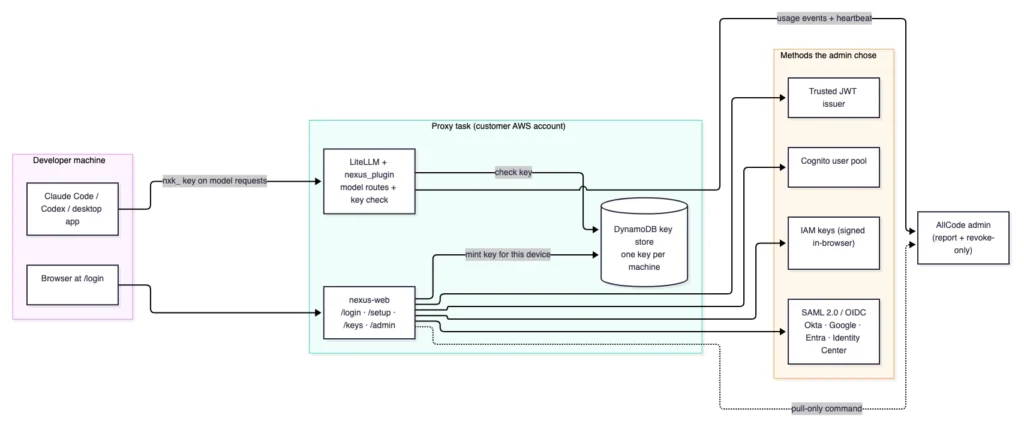
One key per machine, checked by the proxy
The old model was one key per person, shared across tools. The new model is one key per machine,
minted by the proxy when a developer sets up a new device and checked by the proxy on every model
request. Each key carries a name (<device> · <client>), a creation time, a last-used day and an
optional expiry. The key policy lives in the installation settings: an optional lifetime in days,
an optional idle limit, and the most live keys per person (default 10, between 1 and 50).
The key store itself was built behind a contract suite before any real backend existed. We wrote
the Store port and a reference contract, made an in-memory implementation pass it (TASK-482,
TASK-483), then made the DynamoDB adapter pass the same suite (TASK-484). A mutation-style test
asserts the contract actually catches a broken store rather than rubber-stamping one. The proxy
plugin’s key check is wired to the table only when NEXUS_KEYSTORE_TABLE is set, so the behavior
is opt-in per installation and the lookup is timed with perf_counter to keep metering off the
latency budget.
Every sign-in method, ported and hardened
The sign-in core verifies each method against a shared set of test vectors, including a red-team
corpus:
- SAML 2.0 was ported from the old
/connectpath and hardened against signature-wrapping
(XSW), replay and XXE (TASK-487). - OIDC verifies with PKCE and an issuer mix-up defence across the six provider types
(TASK-488). - Trusted-token JWTs go through a verifier with a JWKS cache that passes a shared corpus of
valid and malicious tokens:alg: noneis refused, HS256 key-confusion is refused, a JWKS over
plain HTTP is refused, expired, future-dated, wrong-audience and unknown-key tokens are all
refused (TASK-489). The default mode trades a token once for a device-bound key at
POST /auth/token;directlets the token be the credential;bothallows either. - STS and Cognito verifiers sit behind an SSRF-guarded outbound client (TASK-490), so a
hostile metadata or JWKS URL cannot make the proxy reach somewhere it should not. - IAM-key sign-in signs the request in the developer’s browser, so the secret key never leaves
the machine. MFA can be required and the account root user is always refused.
A method is only offered on the login page when it is switched on and actually working: its
metadata was fetched and, if it needs one, its secret is present. The admin’s Sign-in status screen
shows each method as working or not and why (metadata unreachable, secret missing, certificate
expires in N days). OIDC client secrets are write-only, stored in the customer’s own Secrets
Manager, and never appear in the settings document, a report or AllCode’s systems.
Setup without a long-lived secret on the machine
Setting up a new machine is a browser sign-in plus a one-time code. The setup scripts (setup.sh
and setup.ps1, TASK-505 and TASK-506) and the Nexus Setup desktop app (Go + Wails,
TASK-507) all do the same thing: sign in on the proxy with a device id, redeem a one-time code at
<proxy>/setup/redeem, and write ~/.nexus/key. The redeem-and-mint is a single transaction, so a
code can be spent exactly once (TASK-496). The central setup GET no longer spends or renders a
key, which closes a window where a key could leak into a page.
The desktop app is part of the companion desktop-and-IDE-setup feature. By the owner’s decision on
2026-10-02 its stance is now “install what is missing, configure what exists, ask nothing”: it
detects Claude Code, Codex, Claude Desktop, the ChatGPT/Codex app and the VS Code-family
extensions, installs the ones that are missing with the vendors’ own installers, and configures all
of them. The setup page grew Desktop and Shell tabs to match.
What AllCode can and cannot do
This was a deliberate boundary, not an afterthought. AllCode installs and operates the proxy and
sees a report of a customer’s people and keys, but never a key, a hash, a secret or a session.
Through a pull-only command (the proxy asks for commands; AllCode cannot push into the proxy),
AllCode staff can only take access away: revoke a key, disable a person or end a person’s sessions.
Every such action carries a written reason of 10 to 500 characters and lands in the customer’s
audit. The sign_in.flip action lives in a super-admin-only audit domain.
AllCode staff cannot grant anyone admin, issue a key, read prompts, sign a developer in or change a
customer’s sign-in methods. There is no bypass. A red-team enumeration suite confirms that nothing
on the proxy lists a company’s identity providers to an unauthenticated caller (TASK-523).
Importing the old keys so nobody signs in twice
The migration is designed so a customer’s developers never notice. Existing keys are exported from
the central store and imported into the proxy’s key store, keeping their method and their old
rules, so no one has to sign in again until they set up a new machine. We rehearsed the whole thing
end to end on a copy of dev: import, flip to proxy sign-in, flip back, with the central /connect
refusing flipped installations and the proxy refusing until it is ready (TASK-513, TASK-524). The
central /connect build can be retired entirely behind NEXUS_CONNECT_RETIRED once every active
installation has flipped (TASK-528). There are no waves and no fixed dates: dev flips once built and
proven, customers once dev has been proven.
Proving it before it ships
The feature came with its own test weight, not a bolt-on:
- A red-team suite over the whole proxy sign-in surface: keys, OIDC, SAML, sessions, tokens,
SSRF and plugin-write attempts (TASK-521), plus the IdP-enumeration corpus (TASK-523). - Independence and resilience end-to-end tests: the proxy keeps signing people in and checking
keys with the Usage API stopped and with DynamoDB throttled (TASK-525). - A migration rehearsal on a copy of dev (TASK-524) and a full sign-in-on-the-proxy e2e run
on the docker-compose stack (TASK-522), which turned up and fixed real issues: the settings pull
stays inside its 60-second budget, the dev issuer vouches for its own emails, and the central
setup test names its proxy. - Shared test vectors for keys and trusted tokens, run from both the Go and Python sides so the
two implementations cannot drift.
Landing it on dev
By the end of the week it was running on dev. nexus-web is deployed beside the dev proxy
(REL-481), the execution role pulls the nexus-web image, and the sign-in forward rule sits at ALB
priority 4 ahead of the redirect at 5. The dev stack gained DynamoDB Local and the key-store table,
and the dev OIDC issuer registers the proxy’s callback (TASK-519). A new web CI job tests, lints and
builds nexus-web and the web home before a dev deploy, and the deploy now fails if a service rolls
back or if the smoke check cannot see nexus-web. Three long-standing CI flakes that had been
costing a deploy cycle each finally got pinned down.
Three handoff items for the next session: a real SSO sign-in at /login against a live provider,
confirming the migration on real dev data, and the signing-and-notarisation work the desktop app
still waits on (Apple Developer ID and Azure Artifact Signing). Until those land, the desktop builds
stay internal.
Closing
The theme this week was the same one that runs through the whole project: trust is a systems
property. Moving sign-in onto the customer’s proxy is not one change, it is a key store proven
against a contract, every auth method verified against a hostile corpus, a migration rehearsed both
ways on a copy of production, a revoke-only boundary for AllCode with every action audited, and the
proxy staying up on its own when the mothership is down. Those are the parts that let a customer
believe the sentence “your AI traffic, your AWS account, your login” all the way down.
Related reading
- Nexus Proxy: An Inline Governance Plane for AI Coding Agents on Bedrock
- Building a Billing-Grade AI Usage-Metering Gateway
- AllCode Launches Nexus: Enterprise Governance for AI Coding Tools
Enterprise AI infrastructure, inside your own VPC. Details at nexus.allcode.com.